 CloudPhone
 Blog
Can a cloud phone get you banned? The rules of six games, quoted, plus appeal deadlines
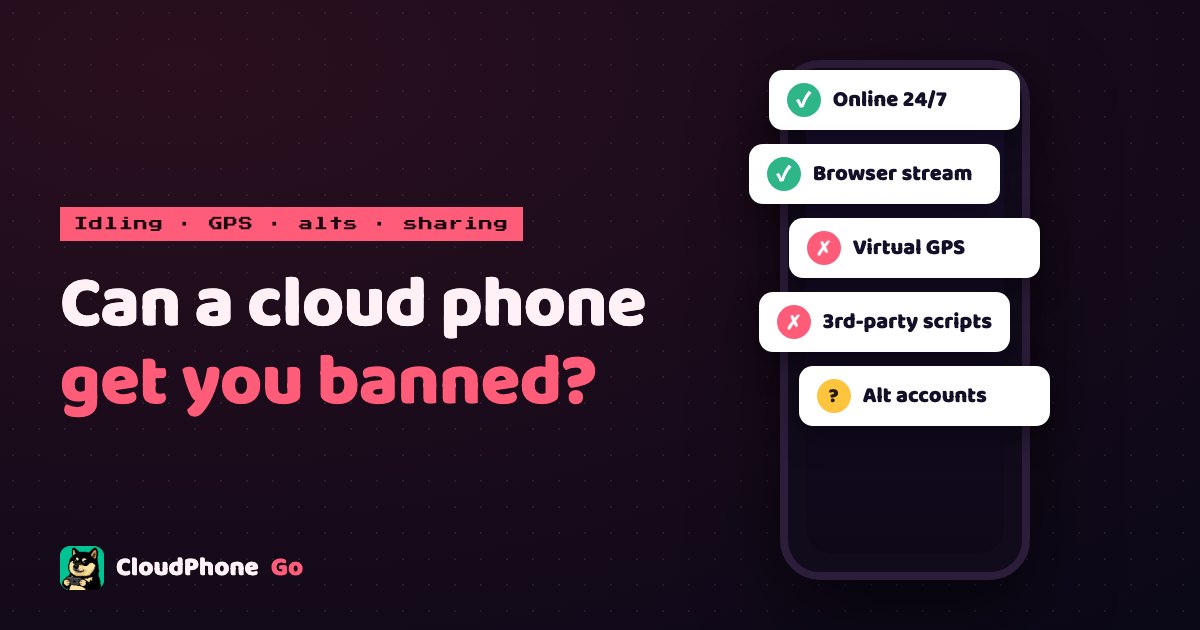
None of the six rulebooks names cloud phones; a cloud phone is a real Android, not an emulator. What the rules do punish is scripts, GPS spoofing, for-profit alts and account sharing, on any phone. Here is each publisher's wording, the safe use of each feature and the appeal deadlines. Our reading, not legal advice.
Can a cloud phone get you banned? Start with what the rules actually say
- One-line answer: a cloud phone by itself will not get you banned. None of the six rulebooks names cloud phones; it is a real Android phone, not an emulator.
- Four things do get accounts banned: third-party scripts and cheats, virtual GPS (Pokémon GO, Pikmin Bloom), for-profit alt accounts, and account sharing or selling. On any phone.
- Bans have appeal deadlines: Lineage M within one month of the lock; the Scopely games through the in-game Help ticket; MapleStory M through Nexon support.
Can you get banned for using a cloud phone? None of the six rulebooks names cloud phones. A CloudPhone Go device is a real Android handset in a data centre, not rooted, with the game installed from Google Play, so the game sees an ordinary phone playing. The closest clauses are two: Lineage M article 5 bans unofficial programs with "sync, link, tap, assist" functions, and Scopely terms section 3.1 bans "modified or unofficial third-party software". Our reading is that both target programs that play the game for you, not a connection that streams the screen to your browser. That is our reading, not legal advice, and the publisher has the final say.
What the rules do name for enforcement is four things: cheat software or automation scripts, GPS spoofing, running several accounts for profit, and account sharing. Doing them on a cloud phone carries the same risk as doing them on the phone in your pocket. This post pulls the actual rule text for the six games players in Taiwan ask about most: Lineage M, Pokémon GO, Pikmin Bloom, Monopoly GO!, MapleStory M and Tower of Saviors, each quote linked to the publisher's own page with its date. We then map every CloudPhone Go feature against those rules and give the safe alternative for each. Appeal routes and deadlines are at the end.
Most mobile anti-cheat checks three things: whether the device is real Android (Google Play services, sensors, normal hardware identifiers), whether it is rooted or patched, and whether one IP or one device carries an unusual number of accounts. Emulators fail the first check, because their hardware identifiers, sensors and CPU architecture differ from a handset. Every CloudPhone Go device is a separate Android system on a physical board in a Taiwan data centre, not rooted, APK untouched; what you see in the browser is a live screen stream, and the game has no way of knowing someone is driving it through a browser. The difference from an emulator is covered in cloud phone vs emulator vs old phone.
The one thing that differs from the phone in your pocket is the IP: a cloud phone's public IP belongs to a Taiwan data centre, not your home fibre or 5G. Whether a game treats that as suspicious depends on how many accounts sit behind one IP and on one device, and how often an account hops between devices, not on the IP coming from a data centre as such. Log many accounts into one cloud phone, or bounce an account between your handset and the cloud phone all day, and some risk systems read that as account sharing or a farm operation. The per-game rules below show where each publisher draws that line.
Which four behaviours get accounts banned?
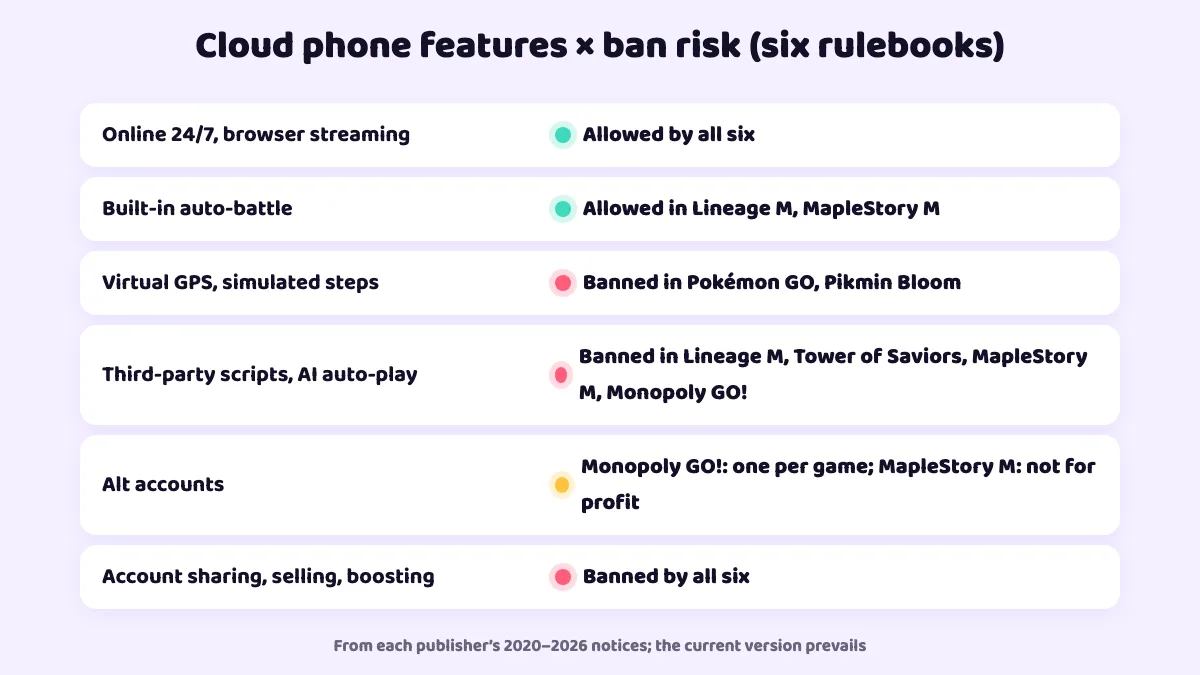
Lay the six rulebooks side by side and the punishable behaviour falls into four groups. The one-line version: built-in idling is allowed in all six, third-party scripts and account sharing are banned in all six, virtual GPS is banned in Pokémon GO and Pikmin Bloom, and alt accounts depend on the game. The rule is identical on a regular phone and on a cloud phone; what differs is whether you do it, and whether you have a safe alternative.
| Behaviour | How the games treat it | Regular phone and cloud phone | Safe alternative |
|---|---|---|---|
| The game's own auto-battle, left running 24/7 | An official feature; keeping it on is not a violation | Allowed | Use as is |
| Third-party scripts, cheats, macro auto-tap | Banned almost everywhere; named in Lineage M art. 5 and the Tower of Saviors notice | Ban | Use only the game's built-in automation |
| Virtual GPS, simulated steps | Forbidden by Pokémon GO and Pikmin Bloom terms section 3.1 | Ban | Leave GPS and steps off in those two games |
| Alt accounts | Depends: Monopoly GO! allows one account per game; MapleStory M bans alts used for profit | Per game | One account per cloud phone; keep alt income for yourself |
| Account sharing, selling, boosting | Forbidden by all six | Ban | Never lend, buy or hire |
So the question to ask is not "will a cloud phone get me banned" but "does this game allow the thing I plan to do on it". Here is each publisher's own text.
Does Lineage M ban idling on a cloud phone? Articles 5 and 17
Lineage M in Taiwan is published by Gamania, and its game management rules were last revised with effect from 18 September 2024. Article 5 is blunt: on any device whatsoever, players may not use any program not supplied by the publisher, including but not limited to physical or virtual tools that provide syncing, linking, operation optimisation, multitasking, clicking, assistance or similar functions. Violation terminates the service contract outright.
Article 17 classes cheat programs, viruses and bug exploitation as serious violations: the character is frozen for seven days and released automatically; if the player is warned and does not stop, or the case is judged severe, the character is frozen permanently. Article 11 sets the appeal window: one month from the lock to contact customer service, after which the penalty is deemed accepted.
For cloud phone players this means: Lineage M's own auto-hunt and auto-potion are official features, and leaving them on 24/7 on a cloud phone is no different from leaving them on a handset; that is exactly how our Lineage M idle setup guide is built. Anything outside the game that taps for you or links several devices, including automated guides from the marketplace, falls under the "clicking, assistance" wording of article 5. Do not use them in Lineage M.
Will virtual GPS get you banned in Pokémon GO and Pikmin Bloom?
Pokémon GO and Pikmin Bloom have been run by Scopely Explore (formerly Niantic) since 2025, and the terms of service were last modified on 15 July 2026. Section 3.1 lists the prohibitions: using any technology to alter or falsify the device's location (for example GPS spoofing), accessing the service in unauthorised ways including modified or unofficial third-party software, playing multiple accounts in the same service, sharing accounts, and selling or trading accounts. Section 3.4 states rooted or jailbroken devices are unsupported, and section 3.5 reserves the right to suspend or terminate without notice.
The player guidelines spell out the consequences: a warning message, account restrictions that degrade the experience, loss of access, or a permanent ban without warning. The current documents promise no fixed number of chances.
These two games are the clearest case in this post: no clause names the cloud phone itself, but CloudPhone Go's virtual GPS, joystick and step simulation are precisely the falsified location that section 3.1 forbids. Our Pokémon GO virtual GPS guide and Pikmin Bloom step counter guide both flag this. Whether to take that risk is your decision; the safe use in these two games is idling and streaming only, with GPS off.
Can you run a second Monopoly GO! account?
Monopoly GO! is published by Scopely, whose terms of service (modified 29 November 2024) state in section 2 that you may have only one account per game on a properly supported device. The same section forbids renting, selling or gifting accounts, forbids creating, using or distributing exploits, cheats, bots, hacks, mods or any unauthorised third-party software, and reserves the right to suspend or terminate accounts without notice; purchases are not refunded.
That leaves exactly one safe way to use a cloud phone with Monopoly GO!: keep your single account on it so it is online for every event and never wastes free dice, as described in Monopoly GO! never waste dice. A second account to trade stickers with yourself breaks section 2 no matter which phone it runs on.
Do alt accounts get you banned in MapleStory M?
The MapleStory M global operation policy (Nexon, effective 29 June 2023) lists two things in clause 6-2-2 as grounds for a permanent restriction: first, using speed hacks, memory hacks, multi-loaders, macro scripts, hacking tools, VPN programs or any other software or hardware not supplied or authorised by the company; second, using multiple accounts or playing in an organised group in order to obtain, trade or transfer items improperly, including for profit. Clause 3-2 adds that account sharing and transfers are not recognised. The Taiwan server is run by a local publisher whose current notice prevails, but the direction is the same.
Read the wording carefully: what is banned is multiple accounts used to obtain items improperly, not multiple accounts as such. One person levelling link-skill alts whose rewards feed their own main is a different thing from a farm running dozens of accounts to sell mesos. The setup we recommend in MapleStory M alt accounts, one cloud phone per alt with its own Google account, exists precisely so risk systems do not see a farm on a single device. Note the "multi-loader" item too: it means tools that run several copies of the game on one device; one cloud phone running one game is not that.
Can you idle Tower of Saviors on a cloud phone?
Mad Head, the developer of Tower of Saviors, said it plainly in its violating-accounts notice updated 4 June 2020: altering the game clock, using any third-party program, coexisting program, auto-orb program, packet modification, proxy server or accelerator counts as a violation, and serious cases lead to permanent suspension. The company publishes the list of banned accounts, which are permanently barred from the Arena.
Tower of Saviors has no official auto-battle, so "idling" in this game effectively means a third-party auto-orb tool, which is an outright violation. The value of a cloud phone for Tower of Saviors lies elsewhere: playing on iPhone, keeping the game off your own storage, and latency low enough to keep up with your finger. The Tower of Saviors guide page covers that.
How do the six rulebooks treat each CloudPhone Go feature?
Mapping the five documents above against the CloudPhone Go feature list gives a "where can I use this, and what do I do where I can't" table. This is our reading, not legal advice; rules change, and the publisher's current notice always wins.
| CloudPhone Go feature | What it is | Rules across the six games | Safe use |
|---|---|---|---|
| Online 24/7, keeps running after you close the browser | A real device with the game left open | Allowed by all six | Use as is |
| Pick up from a browser on iPhone, iPad or PC | A live screen stream; invisible to the game | Allowed by all six | Use as is |
| The game's built-in auto-battle (Lineage M, MapleStory M) | Official feature | Allowed | Use as is |
| Virtual GPS, joystick, step simulation | Falsified location and steps | Banned in Pokémon GO and Pikmin Bloom; irrelevant to the other four | Leave off in those two; the other four have no use for it |
| One-click marketplace guides, AI auto-play, MCP control from an AI agent | Automated tapping from outside the game | Banned by Lineage M art. 5 and the Tower of Saviors notice; MapleStory M 6-2-2 bans macros; Monopoly GO! bans bots | Not in any of the six; keep it for testing your own app or games whose terms do not forbid automation |
| One account per cloud phone | One account on each of several devices | Monopoly GO! and Pokémon GO ban multiple accounts per service; MapleStory M bans for-profit alts | One account only in Monopoly GO! and Pokémon GO; keep MapleStory M alt income for yourself |
The rule of thumb: features that let the game run by itself (online, streaming, built-in auto-battle) are safe in all six; features that make decisions for the game (GPS, scripts, AI) are not permitted by any of the six rulebooks, so keep them for testing your own app or for games whose terms you have checked. The full feature list is on the features page, and how other cloud phones handle these points is in the cloud phone comparison.
How do you keep the risk low, and how do you appeal a ban?
- One game account per cloud phone, signed in with its own dedicated Google account. Do not rotate several accounts through the same device.
- Do not bounce an account between your handset and the cloud phone all day. Pick one as the main device and only glance in from the other.
- Use only the game's built-in automation. Marketplace guides, AI auto-play and MCP belong in testing your own app, or in games whose terms you have checked do not forbid automation.
- No virtual GPS or step simulation in Pokémon GO or Pikmin Bloom. That is section 3.1, not a grey area.
- Never share, lend, buy or sell accounts, and never hire boosters. All six rulebooks list it, and publishers will not help you if a shared account is stolen.
- Keep alt income for yourself. MapleStory M 6-2-2 punishes alts run for profit; the moment you sell currency, the category changes.
- Know the appeal deadline. Lineage M gives one month from the lock; Scopely games take tickets from the in-game Help menu; miss the window and the penalty stands.
If a ban does land, first identify the penalty type. Lineage M article 16 distinguishes character lock, account lock and contract termination; a first cheat-program penalty under article 17 is a seven-day character freeze that lifts by itself, no appeal needed. Scopely penalties range from a warning message to a permanent ban, and the player guidelines guarantee no particular order.
To appeal: Lineage M, call or write to Gamania customer service within one month of the lock (article 11); Pokémon GO, Pikmin Bloom and Monopoly GO!, open a ticket from the in-game Help or settings screen, since Scopely's terms require in-game support first and then escalation to support@scopely.com; MapleStory M, through the Nexon support centre. Stick to facts: which device, whether any program outside the game was running, whether the account was ever shared.
One thing said plainly: the consequences of a ban fall on the account holder, with any cloud phone. What we can do is collect the rule text, label the risk and the safe use of each feature, re-check these six documents every quarter and update this post's date when a rule changes. If you have not decided whether a cloud phone is for you, read other players' experiences in cloud phone reviews first.
Fact-check date: 28 October 2026. The version dates and links of the six rulebooks are in "Sources" at the end; we re-check them every quarter and update this post's date when a rule changes.
FAQ
Do games treat a cloud phone as an emulator or a banned program?
None of the six rulebooks names cloud phones. A CloudPhone Go device is a real Android on a physical board in a Taiwan data centre, with Google Play services, sensors and normal hardware identifiers, not rooted, with the game installed from Google Play, so the tells that expose emulators look like any other handset. The closest clauses are Lineage M article 5 (unofficial sync, link and tap programs) and Scopely section 3.1 (unofficial third-party software); our reading is that they target programs that play the game for you, not a connection that streams the screen to you. That is our reading, not legal advice, and the publisher has the final say.
Can I get banned for idling 24/7 on a cloud phone?
Not for using the game's own auto-battle or auto-hunt. Those are official features, and Lineage M and MapleStory M allow leaving them on. What gets punished is third-party scripts, macros and auto-tapping from outside the game, which Lineage M article 5 and the Tower of Saviors notice ban on any device.
Will virtual GPS on a cloud phone get me banned in Pokémon GO?
It carries real risk and is not a grey area. Section 3.1 of the Scopely Explore terms (modified 15 July 2026) forbids any technology that alters or falsifies the device's location, and Pikmin Bloom is under the same terms. The cloud phone itself is fine; virtual GPS and simulated steps are exactly the falsified location the clause describes.
Can I appeal a ban, and how long do I have?
Yes. Lineage M article 11 gives one month from the lock to appeal to Gamania support, after which the penalty is deemed accepted. Pokémon GO, Pikmin Bloom and Monopoly GO! take tickets from the in-game Help menu, escalating to support@scopely.com if needed. MapleStory M goes through the Nexon support centre.
A cloud phone has a data-centre IP. Will a game treat that as suspicious?
None of the six rulebooks lists a data-centre IP as grounds for a penalty. Anti-cheat looks at how many accounts share one IP or one device, and whether an account keeps hopping between devices. One account per cloud phone, with one device chosen as the main one, is no different from playing on home fibre. Our reading, not legal advice.
Sources
- Lineage M game management rules update (Gamania, effective 18 Sep 2024)
- Scopely Explore Terms of Service (Pokémon GO, Pikmin Bloom; modified 15 Jul 2026)
- Scopely Explore Player Guidelines
- Scopely Terms of Service (Monopoly GO!; modified 29 Nov 2024)
- MapleStory M global operation policy (Nexon, effective 29 Jun 2023)
- Tower of Saviors violating-accounts notice (official Mad Head notice, updated 4 Jun 2020; full text reposted on Bahamut)