 CloudPhone
Blog
Monster Hunter Outlanders: never cap Energy or permits again
Energy parked at 120 and Expedition Permits stuck at 6 are the commonest waste in Monster Hunter Outlanders. This guide maps the daily and weekly routine onto the game's timers, and shows how a cloud phone lets you pick up the same session on your phone at lunch and your PC in the evening.
Setup steps and recommended plan: Monster Hunter Outlanders game guide →
The clocks that run Monster Hunter Outlanders
Ask Monster Hunter Outlanders players what they lose most and it is rarely a hunt. It is Energy sitting at 120 and Expedition Permits stuck at 6. Progress hangs on a handful of timers: Energy back at about 1 every 12 minutes, 3 permits at 05:00 with room for 6, and a Guild Carnival at 12:00 and 18:00. If you work or study, your phone is rarely in your hand at the right moment. This guide is built around those timers, and around running the game on a CloudPhone Go cloud phone so the same session follows you from an office PC to your phone on the train, without relaunching a 3D game that wants a flagship chip to run well.
One thing up front: Monster Hunter Outlanders has no auto-combat. The developers said so plainly in an interview, so this is not an idle game and a cloud phone will not hunt for you. What it does is take a demanding 3D action game off your phone and let you pick it up from a PC, tablet or phone whenever you like.
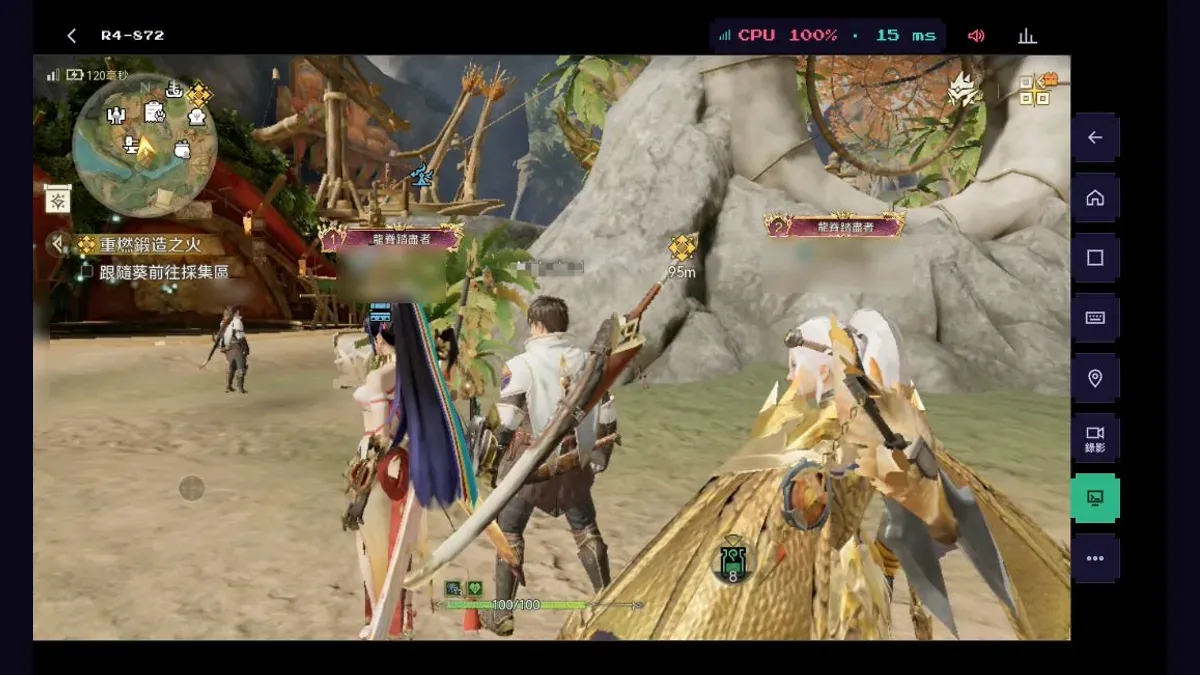
Monster Hunter Outlanders is an open-world hunting action RPG, officially licensed by CAPCOM and developed by TiMi Studio Group. The Google Play version we use is published by Garena and went live on 29 October 2026, Taiwan time. We have run it on CloudPhone Go ourselves, and the screenshot below is the real thing. CloudPhone Go has no partnership with, or licence from, CAPCOM, TiMi or Garena.
We will not explain cloud phones from scratch here; what a cloud phone is covers that. The rest of this page sticks to Outlanders.
Can you AFK in Monster Hunter Outlanders? What runs by itself and what needs you
Plenty of people search for a way to leave Monster Hunter Outlanders running on auto. There isn't one. In an interview with Pocket Gamer the team said outright that there is no auto-combat: rare materials come from hunting them yourself and meeting conditions such as breaking specific parts, while Quick Hunt saves time on routine upgrade materials. The official Code of Conduct also bans scripts, mouse macros, speed tools and other automation.
It helps to split the game into two kinds of thing. Some run on the game's own clock whether or not you are there. Others need you to sign in and tap. A cloud phone only helps with the second kind.
| In the game | Who does it | What a cloud phone adds |
|---|---|---|
| Energy refilling (about 1 every 12 minutes, cap 120) | The game, on a timer | Nothing: being online 24/7 does not make Energy refill faster |
| Daily reset at 05:00, weekly reset on Monday at 05:00 | The game, on a timer | Nothing; the reset comes when it comes |
| Spending Energy on Hunt Requests, claiming with quick hunt | You, signed in | The game stays open on the cloud phone, so a spare minute in a phone or PC browser is enough |
| Daily tasks and the Guild Carnival | You, signed in | Open the same cloud phone from whatever device is at hand when the slot comes round |
| Hunting large monsters and Ascension Challenges | You, by hand: there is no auto-combat | A big PC screen to read the monster, a controller to try, and a phone that stays cool |
| Dailies on your main and your alts | You, on every account | One account per cloud phone; switch with a browser tab instead of signing out and in |
Put simply, a cloud phone is a phone that is always on, never hot in your hand and reachable from anywhere. It is not an idle farm. Hunts are real time and your hunter will not fight without you, so warn your party before you step away; the official Code of Conduct lists going AFK and passive play in groups as violations.
Energy tips: how to spend a 120 cap without wasting it
Energy is what Hunt Requests cost, and Hunt Requests are the main source of upgrade materials for adventurers and Buddies, plus adventurer EXP. These numbers match across GameWith's English and Chinese guides and the Japanese guide sites Game8 and GameWith:
- The cap is 120 and Energy comes back at roughly 1 every 12 minutes, so going from empty to full takes about a day.
- Each Hunt Request costs 20 Energy, so a full bar is exactly 6 runs, worth 200 adventurer EXP each.
- Past the cap, Energy keeps trickling into a reserve, but at a third of the normal speed and only up to 1,200. Sitting at full means throwing away most of a day's refill.
- If your hunting power is above a request's recommended power, quick hunt collects the rewards straight away without playing the fight.
- Rutacoin buys Energy back 40 at a time, with a daily limit and a rising price. Rutacoin also pays for recruiting, so use up your natural Energy first.
- Ecological Rank decides which requests you get: from rank 3 on, harder Hunt Requests (II to V) open up and pay out more materials. Each Ecological Rank needs a higher Adventurer Rank (15, 20, 25 and so on up to 55) plus a won Ascension Challenge, and field monsters get tougher as it rises, so do not rush it before your squad can cope.
On a cloud phone: Energy fills about once a day, so draining it at one fixed time is enough; if your days are irregular, drain it morning and evening. The game is already open on the cloud phone, so opening a browser takes you straight to it instead of relaunching and waiting for it to load on your phone (after a long idle spell the game itself may have disconnected, so go by the screen). Quick hunt whatever you outclass and you are done fast. With alts, work through one browser tab per account, with no signing out. The payoff: no wasted Energy, steady Adventurer Rank every day, and an Ecological Rank that keeps pace.
What players say: Energy is the most argued-about system since launch. A veteran hunter on PTT C_Chat complained that upgrade items and money are all tied to Energy, so once it runs out there is little worth farming; a reply argued the cap exists so people do not finish the content in a day or two. A daily checklist on Bahamut makes the same point as this guide: reserve Energy fills at a third of the speed, so spend it while you can. These are player opinions, not official statements.
Daily and weekly routine: a cloud phone checklist
The official FAQ says the game resets daily at 05:00 server time, and the guide sites list the weekly reset as Monday at 05:00. Here is the day in order, with what the cloud phone does at each step:
- After 05:00, collect the daily handouts: event login rewards and the daily guild supplies (once you join a guild). On a cloud phone: open it in your phone's browser on the commute, collect, close the tab; the cloud phone stays online.
- Drain your Energy on Hunt Requests as above, using quick hunt wherever you can. On a cloud phone: no relaunch, so a spare few minutes does it, and your phone stays cool.
- Finish the daily tasks: 120 activity points pay 3,600 adventurer EXP, from things like signing in and clearing one Hunt Request. On a cloud phone: draining Energy already ticks some of them off; save the ones that need a real hunt for when you are at a computer with the big screen.
- Use your Expedition Permits: from stage 21 of the Path of Expedition each run costs a permit, you get 3 at 05:00 every day and can hold 6. Missing one day wastes nothing; missing two leaves you stuck at the cap. On a cloud phone: on a day you hit 6, clear them in one sitting at your computer.
- Join the Guild Carnival, the timed guild event: guide sites list it at 12:00 and 18:00 (UTC+8), 2 hours 10 minutes each time; trust the in-game countdown. On a cloud phone: the 12:00 slot is your lunch break, from a phone browser; the 18:00 one may start on your commute, so begin on the phone and finish on the home PC, on the same cloud phone with the same progress.
- After Monday 05:00, plan the weekly content: weekly missions, the Arena, the Bounty Contest (five monsters back to back), and the Path of Expedition reset rewards. The Reset Permit refills by 1 every Monday and you can only hold 1, so an unused one does not roll over. On a cloud phone: put the weekly hunts on the PC screen at the weekend.
If you run alts, repeat the same loop in each tab. Every account has to be played by you; never hand it to a script or macro. More alts means more time each day, so keep the number realistic.
What players say: a Bahamut player broke down where the daily activity points come from: signing in (10), one large monster hunt in the field (30), one nest hunt or Hunt Request (30) and one Path of Expedition run (30); the last 20 come easily from small taps like friend intel, a leaderboard like and the guild supplies. The same post says to clear permits at least every two days and to save the weekly Reset Permit until you have reached your highest floor that week. Go by the in-game numbers.
Playing on PC with a controller: how to connect it
Monster Hunter has always been a controller series, and plenty of veteran hunters never quite get used to touch controls. ixbt.games reported at launch (30 October 2026) that Outlanders supports gamepads, but for now only in hunting, exploration and quests, with the rest of the game to follow later. Check the in-game settings for what works today.
On the CloudPhone Go side, connect a controller from External devices in a computer browser, up to 4 at once, in Xbox, Switch or PlayStation mode. The game itself must support controllers. Here is how:
- Connect the controller to your computer.
- Open the CloudPhone Go device page in a computer browser and go into the cloud phone with Outlanders installed.
- Choose Tools, then External devices, and press any button on the controller.
- Pick a slot and a mode (Xbox, Switch or PlayStation), then click Connect. Nothing extra needs installing on the cloud phone.
- Head into a hunt or the field and see whether the controller responds. Older devices need one restart first.
Our team has played this game with a controller on a cloud phone, and it works; which screens accept the controller still depends on the game's own settings. Controllers connect from External devices in a computer browser; on a phone you play with touch. For screens outside hunting, exploration and quests that the controller does not cover yet, just click with the mouse. To type in chat, write the text on your computer and paste it in with Ctrl+V or Cmd+V (allow clipboard access in the browser).
What players say: on Bahamut, a player found no roll icon on screen after switching to a controller; replies said that in classic mode the button still rolls, the icon just is not shown. Another player reported that with a controller the right stick did nothing for switching ammo or target part. Controller support is still partial; when an input does nothing, click it with the mouse.
Does Monster Hunter Outlanders heat up your phone? Let the data centre do the 3D work
Outlanders is a big 3D open-world game. The official FAQ recommends Android 12 or later, a Snapdragon 8 Gen 2 or Dimensity 9200 class chip and at least 8 GB of RAM. The same FAQ admits that raising FPS and graphics can make your phone run hot and drain faster, and suggests turning the settings down.
The FAQ's minimum spec is far lower: Android 9, a Snapdragon 835 or Dimensity 920, 4 GB of RAM. A phone at that end of the range will launch the game, but a full hunt at high graphics is another matter. Put the game on a cloud phone and the data centre device does the 3D work from its own 32 GB of storage; the old phone in your pocket only shows the picture.
| Compared | Playing on your own phone | Playing on a cloud phone |
|---|---|---|
| Heat | Long hunts make the phone hot | The 3D work is in the data centre, so the game does not heat your phone |
| Battery | Higher graphics and FPS drain more (official FAQ) | Only a video stream, which uses less power than running a 3D game |
| Storage | Game and asset files sit on your phone | Installed in the cloud phone's 32 GB, not yours |
| Phone specs | 8 GB RAM and a flagship chip recommended | A recent browser with WebCodecs and a steady connection |
| Calls and app switching | The game drops to the background | The game stays open on the cloud phone |
Watching still costs screen power and data; what goes away is the 3D load. Two different pings show up in the screenshot. The 15 ms in the CloudPhone Go toolbar is you to the cloud phone; the figure in the game's top-left corner is the game to its own servers. Check them separately: the game side with the network check in the game's settings, and the cloud phone side with the connection quality indicator.
- Called into a meeting mid-Carnival: leave the tab, then reopen the same cloud phone from the meeting-room laptop or your phone afterwards, with no relaunch. The hunt does not pause, though, so tell your party first.
- Waiting for the 18:00 slot while reading a build guide: shrink the cloud phone into picture-in-picture in a corner (iPhone Safari works too).
- An iPhone or iPad too old for it: the FAQ recommends an iPhone 13 Pro or newer with 6 GB on iOS. Safari opens the cloud phone running the Android version, and adding it to the Home Screen gives you full screen.
- Phone dead on the commute: the cloud phone keeps running, Energy keeps refilling on its timer, and the office PC picks up where you left off.
What players say: the two complaints that come up most on PTT and Bahamut are heat and battery drain on the phone, and the lack of a PC version. Some also mention waiting several minutes for shaders to compile on first launch. Players on emulators report that stutter usually came from too high a frame-rate cap, and that locking FPS at 60 before raising graphics was steadier. The same order, cap the frame rate first and then add detail, applies on a cloud phone.
Monster Hunter Outlanders alt accounts: one account per cloud phone
The official FAQ is clear: you can sign in to the same account on different devices, but it cannot be online on two at once, and you should not let anyone else use it. So if your main and an alt are going to be online together, each needs its own device. The launch servers (Korea, Asia-Pacific, Middle East and Africa, Latin America) also keep their data separate, with no cross-server parties or friends.
Be realistic about it: with no auto-combat, every hunt on an alt is one you play yourself. Running alts is not about idling several accounts at once. It is about keeping each account signed in on its own cloud phone, so switching is a matter of picking a browser tab rather than logging out and in on your phone.
- Keep your main on your main device: your own phone or a Performance cloud phone, where you hunt and party up.
- One cloud phone per alt: each account stays signed in on its own device, and none of them kicks another offline.
- Switch with browser tabs: keep a tab open per account on your computer and jump to whichever one you want to play.
- Give each account its own sign-in: the game supports Google, Apple, Facebook, Garena and Guest. Use a separate binding for every account, never your main's, and never lend an account to anyone.
Outlanders' Code of Conduct groups scripted bulk registration or control of accounts, bulk resource farming and hoarding to resell into one category, with a 10-year suspension. An alt's Energy and permits are its own; treating it as a material store for your main is exactly the pattern that rule describes. Worth knowing too: CloudPhone Go cloud phones currently connect out through one public IP, so the game sees all your accounts arriving from the same place. The operator decides what counts as bulk, so keep it to one or two alts that you actually play.
Getting started: which plan, and what it costs
- Check the publisher in the cloud phone's Google Play: the Taiwan store lists Garena's Monster Hunter Outlanders, while Japan's store carries a separate Level Infinite release.
- Choose your server once: Korea, Asia-Pacific, Middle East and Africa, and Latin America keep separate data, and the official FAQ says characters cannot move between them. Go where your friends are.
- Decide how you sign in: the FAQ lists Google, Apple, Facebook, Garena and Guest, subject to what the login screen offers. Put your main on an account you already use everywhere, so any device can find it again.
- Start at medium graphics and raise them once it is smooth. In-game times are server time; the countdown on the event page tells you how long until the 05:00 reset.
The official recommendation is at least 8 GB of RAM, so for your main we suggest Performance (8 dedicated cores, 16 GB). An alt that only signs in to spend Energy and clear dailies can try Standard (4 cores, 8 GB) at lower graphics; we have not tested that combination, so judge it by how smoothly it actually runs. Prices below are beta prices. Monthly plans have no lock-in: stop renewing from the billing page any time and keep using the device until the period ends.
| Setup | Plans | Beta monthly | Beta yearly (per month) |
|---|---|---|---|
| Main only | 1 Performance | NT$1,749 | NT$1,489 |
| Main + 1 alt | Performance + Standard | NT$2,678 | NT$2,278 |
| Main and alt both on high graphics | 2 Performance | NT$3,498 | NT$2,978 |
| Main on your own phone, 1 alt | 1 Standard | NT$929 | NT$789 |
Payment goes through Stripe, and the billing page shows your renewal date, lets you stop renewing and download invoices. When you are finished, you can reset the cloud phone to factory state, which clears game logins and data.
The Code of Conduct and account risk
The official Monster Hunter Outlanders Code of Conduct (29 October 2026) lists as violations: cheats, scripts, speed tools, mouse macros and other third-party tools or automation; using scripts to register or control accounts in bulk and farm resources; going AFK or playing passively; sharing, renting, transferring or selling accounts; and boosting or piloting services. Penalties run from warnings, chat bans and feature limits to suspensions. Accounts registered or controlled in bulk by script are suspended for 10 years, and severe cases can get longer bans plus a ban on the devices involved.
The rules do not directly forbid one person owning several accounts, but scripted control, bulk resource farming, hoarding items to resell or lending an account crosses the line. Running many accounts and pooling resources into one can look like a studio or bulk operation. This game's rules clearly ban automation, so please do not use any script, macro or auto-play tool on Outlanders.
Two details are easy to miss. The rules say violations not caught at the time can be handled later through an offline review, so a quiet week proves nothing. And penalties go beyond bans: chat bans of up to 7 days, feature limits and clawed-back resources are all on the list. A cloud phone is a real Android device rather than an emulator, and what gets judged is what you do in the game. The wider picture is in Can a cloud phone get you banned?
What players say: two weeks after launch, Bahamut players were already complaining that the limited-character time-attack ranking is flooded with cheaters, and noted that the Japanese release runs on its own servers; that is a player claim, and no official enforcement result has been published. Another thread flags a scam pattern: you get pulled into a guild, then the leader messages you to add them on LINE and move to some other game, and several players replied that the same thing happened to them. Leave the guild if that happens, and turn on two-factor sign-in for the account you play on.
Common mistakes and troubleshooting
- Leaving Energy at the cap: past 120 it only trickles into reserve at a third of the speed. Drain it at least once a day.
- Raising Ecological Rank the moment you can: field monsters get tougher with it, so hold off on the Ascension Challenge until your squad is ready.
- The same account on two devices: the official FAQ says it cannot be online on both at once. Keep each account on one device.
- An alt on a different server from your main's party: servers do not share data, so there are no cross-server parties or friends.
- The controller does nothing: controllers connect from External devices in a computer browser; older devices need one restart; and the game currently supports controllers only in hunting, exploration and quests.
- Stutter at high graphics: lower graphics and FPS first, then raise them step by step.
- Buying Energy with Rutacoin all 5 times: the daily refills cost 50, 100, 200, 200 and 300 Rutacoin, and Rutacoin also pays for recruiting. Use natural Energy and Energy Bottles first.
- Letting Expedition Permits sit: 3 arrive at 05:00 and refills stop at 6. A few runs at lunch on the cloud phone keep you under the cap. For stutter or input lag on the stream itself, see fixing cloud phone lag.
FAQ
Can Monster Hunter Outlanders fight on auto?
No. The developers told Pocket Gamer there is no auto-combat, and rare materials come from hunting yourself. The Code of Conduct also bans scripts, mouse macros and speed tools. What saves time is quick hunt once your power is high enough.
How often should I spend Energy?
Energy refills at about 1 every 12 minutes up to 120, so empty to full is roughly a day. Once a day is enough, twice if your hours are irregular. A Hunt Request costs 20, so a full bar is exactly 6 runs.
Does Energy keep refilling once it is full?
It overflows into a reserve, but at a third of the speed and only up to 1,200. Time spent sitting at 120 throws most of the refill away, so do not leave it there.
Do unused Expedition Permits go to waste?
You get 3 at 05:00 each day and can hold 6; at 6 the refill stops. Skipping one day is fine, skipping two leaves you capped. From stage 21 every run needs a permit.
Can I play Outlanders on PC with a controller?
CloudPhone Go connects up to 4 controllers from External devices in a computer browser. The game itself must support them, and launch reports say that covers hunting, exploration and quests for now. Our team has played it with a controller on a cloud phone, and it works.
Do alt accounts break the Code of Conduct?
Owning more than one account is not banned outright, but scripted bulk registration or control, bulk farming and hoarding to resell carry a 10-year suspension, and violations can be handled later by offline review. Cloud phones share one public IP, so keep to one or two alts you play yourself.
Is there a PC version of Monster Hunter Outlanders?
As of 11 November 2026, Bahamut and PTT threads show no official PC client yet; players who want a big screen use emulators or tablets, and some say emulators are heavy on the graphics card and stutter. A cloud phone is another route: the game runs on an Android device in the data centre, your computer only needs a browser, and controllers connect from External devices.
Sources
- Google Play: Monster Hunter Outlanders (Garena Online Private Limited)
- Google Play Japan: Monster Hunter Outlanders published by Level Infinite (a separate release from Garena's)
- Monster Hunter Outlanders official site (Garena, Traditional Chinese): Hunter FAQ, 28 October 2026 (launch time, servers, device requirements, multi-device sign-in, 05:00 daily reset, heat and battery)
- Monster Hunter Outlanders official site (Garena, Traditional Chinese): Code of Conduct, 29 October 2026
- Pocket Gamer: interview with the Monster Hunter Outlanders dev team (no auto-combat, Quick Hunt)
- ixbt.games launch report, 30 October 2026 (controller support scope)
- Dengeki Online launch report on the Japanese release (Level Infinite), 29 October 2026 (partial controller support)
- GameWith (Traditional Chinese): Energy recovery and uses (cap, reserve, Rutacoin refills, quick hunt)
- GameWith (Traditional Chinese): daily and weekly checklist (daily tasks, Expedition Permits, Guild Carnival, weekly content)
- GameWith (Traditional Chinese): raising Ecological Rank (Adventurer Rank thresholds, Ascension Challenge, tougher field monsters)
- GameWith: Monster Hunter Outlanders Energy guide
- Game8 (Japanese release): Energy recovery and uses (1 per 12 minutes, reserve Energy)
- Game8 (Japanese release): daily and weekly to-do list (05:00 daily, Monday 05:00 weekly reset)
- Game8 (Japanese release): Ecological Rank (生態レベル), how to raise it and what it unlocks
- GameWith Japan (Japanese release): daily routine (3,600 EXP from daily tasks, EXP per Hunt Request)
- Apple Support: add a website to the iPhone Home Screen in Safari
- Bahamut Monster Hunter Outlanders board: daily and weekly checklist, 11 November 2026 (player post)
- PTT C_Chat: "worth a try, but too much of a mobile game", 9 November 2026 (player discussion)
- PTT C_Chat reply on the Energy cap, 9 November 2026 (player discussion)
- PTT MH: player review, 4 November 2026
- PTT C_Chat: "it's OK" thread and replies, 9 November 2026
- Bahamut: "is there no PC version?", from 29 October 2026 (player discussion)
- Bahamut: emulator settings, FPS cap at 60, 9 November 2026 (player post)
- Bahamut: no roll icon after switching to a controller, 4 November 2026
- Bahamut: emulator and controller setup thread, 5 November 2026 (right stick report)
- Bahamut: cheaters in the time-attack ranking, 11 November 2026 (player claim)
- Bahamut: guild-to-LINE "new game" scam pattern, 9 November 2026