 CloudPhone
Blog
MapleStory : Idle RPG gains guide: online hunting, Hot Time and alts
If Full Auto was on and you still earned little, the game was probably in the wrong state: backgrounded it neither fights nor counts as offline, a map change costs 40 seconds of spawns, and a closed game pays a flat rate. We walk through those mechanics, the daily loop and the anniversary event, then show how a cloud phone keeps the game in the foreground.
Setup steps and recommended plan: MapleStory : Idle RPG game guide →
Full Auto on, but barely any gains? How MapleStory : Idle RPG actually pays
The most common complaint about MapleStory : Idle RPG goes like this: Full Auto was on all along, yet the haul is tiny. The culprit is rarely a weak character. It is the state the game was in. According to the player-run wiki, a backgrounded game stops attacking without counting as offline, every map change costs 40 seconds before spawns are back to full, and a fully closed game is paid at a flat 51 kills a minute. This post works through those mechanics in order: where to park, the daily loop, spending, the first-anniversary Hot Time, alts and guild help. Along the way it shows which of those losses a CloudPhone Go cloud phone removes.
The wiki's Hunting and Offline Rewards page says it outright: for your phone's sake, use a secondary device to stay online, because staying online is how you get the most out of hunting. A cloud phone is that secondary device: an Android phone in a Taiwan data centre that keeps the game in the foreground, which you open in a browser only when you need to tap something. If the idea is new to you, start with what a cloud phone is.
MapleStory : Idle RPG is Nexon's idle take on the MapleStory IP, co-developed with Able Games and launched worldwide on 6 November 2025. On Google Play it is published by NEXON Company and has passed 5 million downloads, and the first-anniversary update in November 2026 added the Dawn Warrior and Blaze Wizard classes. Japan, China, Vietnam, Slovakia and Belgium were left out of the global launch. It is a different game from MapleStory M, an MMORPG where alts are mostly about link skills; that one has its own alt account guide.
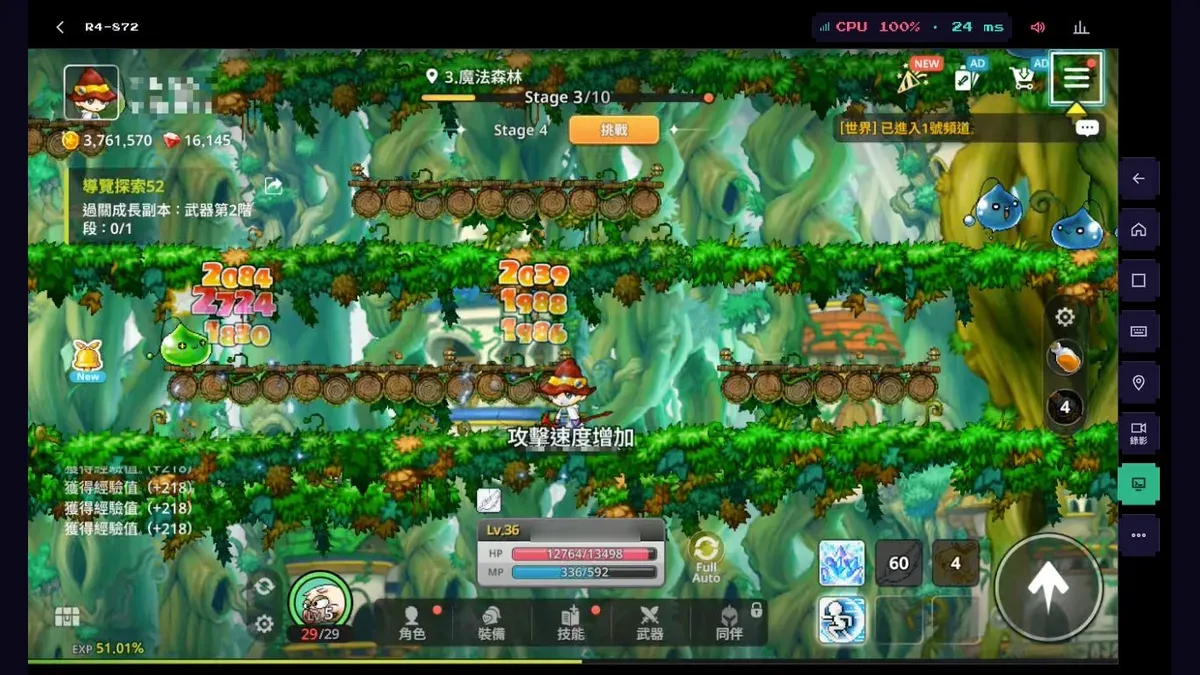
The screenshot below is the game running on CloudPhone Go. CloudPhone Go has no partnership or licensing relationship with Nexon or Able Games.
Background, offline, online: same idle time, very different rewards
The store listing promises your character keeps getting stronger at school, at work or in bed, and auto-battle and auto-growth do carry on while you are offline. But being offline and being in the background are two different things.
According to the player-run MapleStory Idle RPG Wiki, you only go offline when you close the game fully, and offline rewards need at least 5 minutes away. If you just switch apps without closing it, the game may keep running in the background with your character not attacking, and that time does not count as offline until the session expires, which the wiki puts at roughly an hour. If you forgot to close it and tapped the game open again, the wiki's fix is to switch away and force-close it before it finishes loading; that stretch still counts as offline.
Leaving the game alone pays differently depending on what state it is in. This table follows the wiki; the numbers that count are the ones the game shows you.
| State | What your character does | How rewards work |
|---|---|---|
| Your phone, game in the foreground | Keeps hunting, Full Auto casts skills | Based on your kill speed, but the screen stays on and the phone stays plugged in |
| Your phone, game in the background | Stops attacking, not offline yet | Mostly wasted until the session expires and offline time starts |
| Game fully closed | Offline | Settled at a fixed rate for the last map you reached, after at least 5 minutes |
| On a cloud phone, browser tab closed | Keeps hunting online | Based on your kill speed, and your own phone is free |
So on your own phone, every time you hop over to messages or a video, your character is probably standing still. A cloud phone flips that around: the game lives on a phone in the data centre, always in the foreground, whatever you do on your own device.
What players say: in a March 2026 thread on the Bahamut MapleStory : Idle RPG board, a player used an unplanned maintenance to compare: over the same 2 hours 10 minutes, offline earned 0.261% EXP and online earned 1.054%, roughly four times as much (he had no Premium pass). Replies say that with the pass offline runs at about 75 kills a minute, which matches the wiki's 1.5x Premium multiplier on offline rewards, while online runs at roughly 100 to 110. The built-in power-saving screen (the one with the clock) earns the same EXP as the normal screen, and another thread says idling in Henesys earns the same as a hunting map. One player complains the design forces you to keep a device on all day. These are individual tests and the gap varies with map and clear speed, so go by what you actually earn.
Idling strategy: stop map-hopping and pick a map you can clear every wave
The strategy first. According to the player-run wiki, online hunting spawns in waves. For the first 40 seconds on a new map you only get 28 to 35 monsters a wave; after 40 seconds on the same map it rises to 64. Monsters you have not killed when the next wave arrives do not pile up; they are simply wasted. Offline rewards ignore all of that and pay a flat 51 kills a minute at the latest map you reached.
| Chapter | Wave interval | Monsters per wave (after 40 s) | Max kills per minute if you clear every wave |
|---|---|---|---|
| 1 to 3 (not 1-1) | 20 s | 64 | about 192 |
| 4 to 5 | 25 s | 64 | about 154 |
| 6 to 10 | 30 s | 64 | 128 |
| 11 onwards | 35 s | 64 | about 110 |
| Offline (game fully closed) | n/a | n/a | a flat 51, at the latest map reached |
- Park where you clear every wave. Online rewards come from what you actually kill, so leftovers are lost. If a new map is too slow, step back one map and you will earn more.
- Stop map-hopping. Every time you enter a new map (coming back from town excepted) you wait another 40 seconds for full spawns, and that includes returning from a dungeon.
- Push to your highest map before you close the game. Offline rewards use the latest map reached, not the one you were parked on. PocketGamer's guide gives the same advice: advance as far as you can before logging out.
- Push forward once you clear comfortably. The treasure gauge added in the August 2026 update fills from idle-hunting kills, and faster in higher chapters (official announcement).
How to do it on a cloud phone: pick the map you clear, check Full Auto is on, and close the browser. The character stays on that map and online the whole time. Answering a message does not stop it, and you never reopen the game and sit through another 40-second warm-up. The payoff is the longest possible stretch at full spawns: from chapter 11 on, clearing every wave online is roughly double the offline rate (about 110 versus 51 kills a minute). These are the wiki's figures, not Nexon's, and whether you hit them depends on your clear speed, so go by what you actually earn.
What to do when you check in: dungeons, Arena and World Boss
The cloud phone keeps your character hunting 24/7, but a lot of MapleStory : Idle RPG's resources come from fixed daily content. First, what runs by itself and what needs a tap from you:
| Content | Runs unattended? | What you do |
|---|---|---|
| Map hunting (Full Auto) | Yes | Pick a map and leave it. Daily kills also advance the daily-reset Battle Pass for Red Diamonds (per the wiki) |
| Party Quest exploration | Yes, with tickets | Exploration moves Party Quests along while you keep hunting; one ticket a week, two hours each (official release) |
| Growth dungeons (Weapon, EXP, Equipment, Hero Training Ground, Enhancement) | You start each run | 3 free keys a day for each (per the wiki); the August 2026 update added a one-tap sweep for all five (official announcement) |
| Arena, World Boss, Guild | You do it | Pick an Arena opponent, enter the World Boss, and use the guild's limited daily building upgrades |
Check in at the same time each day and work through this list before you leave:
- Sweep the growth dungeons. Per the wiki, the Weapon Dungeon is the main free source of Weapon Summoning Tickets and Weapon Enhancers, and the Equipment Dungeon is the main free source of Elite Monster Summoning Points. The Weapon Dungeon has 70 stages and the EXP, Equipment and Enhancement dungeons 90 each, unlocking one at a time; skip a stage you cannot beat and come back stronger.
- Fight in the Arena. You get 5 entry tickets at server midnight and can hold up to 20 (per the wiki), so check in at least every 4 days or the new tickets go to waste.
- Hit the World Boss once. Rewards are paid on daily and weekly rankings, and taking part earns World Boss Coins for its shop (per the wiki).
- Look after your guild. Answer members' help requests (they expire after 12 hours) and upgrade guild buildings, which can only be upgraded a set number of times a day (per the wiki).
- Go back to a map you clear, check Full Auto is on, and close the browser.
Once a week, also check exploration tickets (one a week), the weekly Journey chest in the Hero's Journey (勇士旅程) growth system added in June 2026 (it unlocks after stage 20-10), and guild contribution, which resets at midnight on Monday. The first two come from official announcements and the last from the wiki; updates can change them, so trust the in-game text.
How to do it on a cloud phone: open it in a desktop browser. Dungeon stages and rankings are easier to read on a big screen, and you can type guild chat on a real keyboard. Per the wiki, without Premium Membership the time you spend in dungeons, the Arena or the World Boss does not count as hunting, and going back to the map restarts the 40-second warm-up, so do your dailies in one sitting. The payoff: one visit a day, then the character spends the rest of the day on a map at full spawns, and your own phone never has to keep the game open.
Spending resources: spread weapon upgrades, use pity, choose treasure cards
Spending what you earn in the right place matters more than one more dungeon run. Here is where each resource comes from and how to avoid wasting it:
| Resource | Main sources | How to spend it well |
|---|---|---|
| Weapon Summoning Tickets, Weapon Enhancers | Weapon Dungeon, map drops | Weapons are the main way to raise Attack. You equip only one, but every weapon has an always-on inventory effect, so spread upgrades instead of pouring everything into one (wiki, PocketGamer) |
| Red Diamonds | Daily Battle Pass kills, events | Nexon says Red Diamonds get you weapons and companions. A September 2026 announcement introduced guaranteed summons: after a set number of weapon, companion or relic pulls, the next one is the top grade (official announcement) |
| Elite Monster Summoning Points | Equipment Dungeon, map drops | Tap the summon button at the bottom left to call an Elite Monster that drops gear; a higher Summoning Level means better odds of high-tier gear (per the wiki) |
| Treasure gauge | Idle-hunting kills, faster in higher chapters | At 100% you pick 1 of 4 cards: Star Force scrolls, cubes, meso or spell traces. The cards you skip pay more next time, so pick what you are short of (official announcement) |
Planning the anniversary Hot Time: do not waste the 1,000% hour
The first-anniversary event runs from 5 November to 16 December, and its shop currencies stay usable until 18 December. The part that matters most for idling is the 1,000% EXP Hot Time: once a day, for one hour, EXP gains go up by 1,000% (official announcement). Start it in this order so the whole boost lands on kills:
- Stand on a map where you clear every wave and wait out the first 40 seconds, so spawns go from 28 to 35 a wave up to 64 (per the wiki).
- Check that Auto is on Full Auto. The wiki lists three levels, Full Auto, Basic Auto and Off; Basic Auto only uses basic attacks, while Full Auto casts every skill.
- Only now start the Hot Time, and stay out of dungeons, the Arena and the World Boss for the hour: without Premium Membership that time does not count as hunting, and you restart the 40-second warm-up when you come out (per the wiki).
- Do not use Quick Hunt during the hour either. Per the wiki, Quick Hunt pays a fixed number of kills at your last map instantly, but no EXP, meso or drop-rate boosts apply to it.
- Then close the browser tab. The game stays in the foreground on the cloud phone for the full hour, with no phone in your hand and nothing for an incoming call to interrupt.
The anniversary update also lets existing players change class to the new Dawn Warrior or Blaze Wizard (official announcement). If you plan to switch, do it first and confirm the new class still clears your usual map on Full Auto before you start that day's Hot Time, so the boosted hour is not spent learning a new kit. One more wiki detail: the in-game sleep mode (local time at the top, a character hitting a slime over and over) and standing in a town map both count as online hunting.
What are alts for here? The new-character event, its boss and guild help
Alts in MapleStory : Idle RPG are not about link skills the way they are in MapleStory M. In this game the useful reasons are the anniversary's new-character growth event and guild help:
- New-character growth event: only for accounts created from 5 November, running until 16 December. Characters start at level 30, 30 players form a group, and over 60 days they work through level, challenge and repeat missions. Challenge points unlock boosts such as more free growth dungeon ticket refills and shorter upgrade times, and the group's point ranking pays a daily EXP boost (official announcement).
- The event boss: you get one entry ticket a day, the whole group's combined damage brings it down, and rewards follow personal and group damage (official announcement). That is a daily tap for each alt.
- Growth support pass: characters created after 5 November get rewards at set levels between 30 and 70 and between 70 and 100 until 6 January 2027, including a potion that raises you one level when used at certain levels (official announcement).
- Guild help: per the wiki, you can ask guildmates to speed up skill research and Elite Summoning research. Each request can be helped up to 10 times a day, each help cuts 10 minutes, and the request expires after 12 hours. Helping raises your guild contribution, which resets every Monday at server midnight.
Keeping alts on cloud phones means each account stays signed in on its own device. When it is time to hit the event boss, answer guild requests or spend dungeon keys, open a few browser tabs on your computer and go down the line, with no account switching on your phone. Nexon's terms still forbid creating multiple accounts within 24 hours or five or more within 30 days, so even an event alt has to wait its turn. And because CloudPhone Go's cloud phones currently share one public IP, the game sees your main and alts on the same address; keep the count low.
The 4 GB RAM minimum: which plan for your main and which for alts
Google Play lists Android 7 and 4 GB of RAM as the minimum. CloudPhone Go's Starter plan has 2 cores and 4 GB, right on that line, and we have not yet confirmed how it holds up over long sessions. If the cloud phone's Google Play says the device is not compatible, use Standard (4 cores, 8 GB). Both come with 32 GB of storage. A sensible split is a Standard main that runs the daily Hot Time and Starter alts that only log in for the event boss and guild requests. Prices are beta prices, billed monthly with no lock-in.
| Use | Plans | Beta monthly | Beta yearly (per month) |
|---|---|---|---|
| Main only, no daily Hot Time | 1 Starter | NT$489 | NT$419 |
| Main + 1 alt in the new-character event | 2 Starter | NT$978 | NT$838 |
| Main + 2 alts sharing guild requests | 3 Starter | NT$1,467 | NT$1,257 |
| Steadier main with higher graphics + 1 alt | Standard + Starter | NT$1,418 | NT$1,208 |
Size it by how many accounts you will actually check on each day. Every account has its own dungeon keys, Arena tickets and event boss ticket to use, and an alt you never visit is just running Full Auto in place.
Full Auto is fine; the guide marketplace and AI auto-play are not
Full Auto is the game's own built-in feature, and running it on a cloud phone is no different from running it on any phone. The thing to avoid is automation from outside the game: Nexon's Terms of Service (effective 8 September 2026) forbid macros, auto-looting or bot play that makes your character act on its own, whether or not you are present. CloudPhone Go's guide marketplace and AI auto-play fall into that category, so do not use them with this game.
The same terms forbid selling in-game items or currency on third-party sites, so whatever your alts earn stays on your own accounts. We could not find an operating policy specific to MapleStory : Idle RPG, so in-game notices are the final word. How a cloud phone itself affects an account is covered in can a cloud phone get you banned?
Earning less than you expected? 8 common MapleStory : Idle RPG mistakes
- Backgrounding the game on your phone, then reopening it: that time counts as neither online nor offline (per the wiki). Do not let it load; switch away and force-close it first, and the wiki says the stretch still counts as offline.
- Closing the game inside the cloud phone: online hunting turns into the flat 51-a-minute offline rate. To leave, close the browser tab.
- Map-hopping: each new map (except coming back from town) spawns only 28 to 35 a wave for the first 40 seconds, and the same applies after a dungeon (per the wiki).
- Parking where you cannot clear the waves: per the wiki, monsters still alive when the next wave arrives are simply discarded, and if your character keeps falling you lose even those. Go back one map to where you clear every wave and your real kill count goes up.
- Closing the game while parked on an earlier map: offline rewards use the latest map reached, not where you parked, so push to your highest beatable stage first.
- Letting Arena tickets cap out: 5 arrive at server midnight and you can hold 20 (per the wiki), so four days without a fight wastes the new ones.
- Letting guild requests lapse: they expire after 12 hours (per the wiki), so answer them at least once a day.
- Entering a dungeon or using Quick Hunt during Hot Time: the first does not count as hunting and the second ignores boosts (per the wiki), so the 1,000% hour goes to waste.
Connection problems such as no picture or input lag have nothing to do with the game; see fixing cloud phone lag.
FAQ
On a cloud phone, does closing the browser count as online or offline?
Online. Per the player-run wiki, you only go offline when the game itself is fully closed. Closing the browser just stops you watching; the game stays in the foreground on the cloud phone and keeps killing each wave. Close the game inside the cloud phone and you drop to the flat 51-a-minute offline rate.
What should I do when I check in each day?
Per the wiki: 3 free keys a day for each of the five growth dungeons, Arena tickets (5 a day, up to 20 stored), the World Boss for daily and weekly rankings, and guild requests before they expire at 12 hours. Until 16 December, add the once-a-day 1,000% Hot Time (official announcement).
Is Quick Hunt better than hunting online?
Per the wiki, Quick Hunt pays a fixed number of kills at your last map: 1,000 the first time, 5 more with each use, up to 3,000, with no EXP, meso or drop boosts applied. Treat it as a top-up, not a replacement for online hunting, and never during Hot Time.
Is MapleStory : Idle RPG the same game as MapleStory M?
No. MapleStory : Idle RPG is an idle RPG co-developed by Nexon and Able Games and launched worldwide in November 2025; MapleStory M is an MMORPG where alts are mostly about link skills. See our separate MapleStory M alt accounts post.
Is the Starter plan enough?
Google Play lists Android 7 and 4 GB of RAM as the minimum. Starter (2 cores, 4 GB) sits right on it, and we have not yet confirmed long sessions. For a main that runs the daily Hot Time, or if Play says the device is not compatible, use Standard (4 cores, 8 GB).
Anything to watch when making an alt for the anniversary event?
The new-character event only counts accounts created from 5 November. Nexon's terms forbid multiple accounts within 24 hours or five or more within 30 days, as well as bots and selling items on third-party sites. Cloud phones currently share one public IP, so one or two alts is plenty.
With Premium, how big is the gap between offline and online?
Per the player wiki, Premium multiplies the offline reward by 1.5, so about 76 kills a minute; Bahamut players report roughly 100 to 110 a minute online, and one player without Premium measured about a fourfold EXP gap. It depends on the map and your clear speed. Go by what you actually earn in the game.
Sources
- Google Play: MapleStory : Idle RPG store page (NEXON Company; description, minimum requirements, anniversary update notes)
- Denfaminicogamer: MapleStory: Idle RPG global launch date announced, 2025-10-29 (6 November launch, regions excluded)
- gamebiz: Nexon launches MapleStory: Idle RPG worldwide, 2025-11-06 (auto-battle and auto-growth continue offline)
- Nexon press release on Anime News Network, 2026-05-21 (Exploration system and tickets)
- MapleStory Idle RPG Wiki (player-run): Hunting and Offline Rewards
- MapleStory Idle RPG Wiki (player-run): Auto
- MapleStory Idle RPG Wiki (player-run): Dungeons
- Nexon Terms of Service and End User License Agreement (effective 2026-09-08)
- MapleStory Idle RPG Wiki (player-run): Weapons (inventory effects)
- MapleStory Idle RPG Wiki (player-run): Weapon Dungeon
- MapleStory Idle RPG Wiki (player-run): Equipment Dungeon
- MapleStory Idle RPG Wiki (player-run): EXP Dungeon
- MapleStory Idle RPG Wiki (player-run): Enhancement Dungeon
- MapleStory Idle RPG Wiki (player-run): Elite Monsters
- MapleStory Idle RPG Wiki (player-run): Arena (ticket refill and cap)
- MapleStory Idle RPG Wiki (player-run): World Boss
- MapleStory Idle RPG Wiki (player-run): Guild
- MapleStory Idle RPG Wiki (player-run): Pass (daily Battle Pass and Red Diamonds)
- PocketGamer: MapleStory Idle RPG guide: 6 tips to fast-track all that idling, 2025-11-26
- Bahamut GNN (Traditional Chinese): launch date announcement, 2025-10-29 (what Red Diamonds are for)
- Bahamut GNN (Traditional Chinese): summer event, boss-card growth system and guild raid, 2026-06-11
- Bahamut GNN (Traditional Chinese): treasure gauge system and one-tap growth dungeon sweep, 2026-08-13
- Bahamut GNN (Traditional Chinese): Pink Bean raid update and guaranteed summons, 2026-09-03
- Bahamut GNN (Traditional Chinese): first-anniversary event, 1,000% Hot Time and new-character growth event, 2026-11-05
- Bahamut MapleStory : Idle RPG board (Traditional Chinese): online vs offline idle EXP difference, 2026-03-08
- Bahamut MapleStory : Idle RPG board (Traditional Chinese): does idling in Henesys give less EXP than a hunting map?, 2026-07-04