 CloudPhone
Blog
Chiikawa Pocket: battle reward maths, unlock order and a cloud phone
Close Chiikawa Pocket and coins only fill the battle reward, which by a Japanese guide's numbers caps after roughly half a day. Here is that maths, the daily list and the unlock order, and how a cloud phone keeps the app open instead.
Setup steps and recommended plan: Chiikawa Pocket game guide →
How long does Chiikawa Pocket's battle reward take to fill, and why keep the app open?
Close Chiikawa Pocket and the battles carry on, but the coins stop landing in your wallet. They go into the battle reward counter beside the battle screen instead, and that counter stops at 100%. The Japanese guide site AppMedia puts 50% at about six hours' worth, so by that ratio a full counter takes roughly half a day. Sleep through the night, spend the morning at work, and the back half of that stretch earns nothing. With the app open it is a different story: Kouryaku Daihyakka notes that as long as the app is on screen, even away from the battle view, the team keeps looping and coins keep coming with no cap.
The catch is that keeping the app open means keeping your phone's screen on and the game running all day, and the same guide warns that drains the battery and warms the phone up. Install the game on a cloud phone instead, a real Android phone sitting in a data centre (the idea in brief), and the phone holding the app open is that one, not yours. You only open a browser when you want to look.
Chiikawa Pocket is the Chiikawa mobile game developed and run by Applibot, released on March 27, 2025 in 43 countries and regions. Chiikawa and friends battle monsters on their own to earn coins, while you level up stats, pull the gacha, pull weeds and decorate your home screen. This guide starts with the battle reward maths, moves on to upgrades, the daily list, the gacha and the order things unlock on a new account, and ends with moving your save to a cloud phone and the rules on alts.
What runs by itself in Chiikawa Pocket, and what needs you?
Not every mode can be left alone. Here is what Japanese guide sites report. The global version we installed on our Taiwan cloud phone has the same AUTO ON button and battle reward counter.
| Mode | Runs by itself? | What a cloud phone changes |
|---|---|---|
| Battle (AUTO ON) | Coins keep coming in while the app is open; with it closed, only the battle reward fills, up to 100%. After a loss it drops back one stage and keeps going | The app stays open 24/7, so coins keep flowing and nothing hits the cap |
| Om Nom Fest food stalls | Put characters on the stalls and cooking coins build up over time; Kouryaku Daihyakka lists it alongside battles as an idle mode | Collect the cooking coins when you check in and spend them on dish levels for stat bonuses |
| Attack, health and other stat upgrades | You spend coins by hand | Check in once a day and spend what piled up |
| Weeding | Manual. It runs on an energy meter (genki in the Japanese version) that refills over time and stops once full | Do a round from any browser so the energy does not go to waste |
| Study (benkyou, unlocks at 25 m of weeding) | Runs on a real-time timer once started; you come back to queue the next one | Queue the next study whenever you check in |
| Special battles | You spend battle tickets on them yourself | Use the tickets when you check in instead of letting them hit the cap |
| Gacha and rewarded ads | You tap them yourself | Switch over from your phone or PC, tap, leave |
The battle reward is not the only thing that fills up. Kouryaku Daihyakka says special battle tickets refill over time, and weeding energy stops refilling once it is full. A cloud phone will not spend those for you. What it changes is the first row: the app never has to close, so coins do not wait for you to come back.
Only with the battle screen open: presents, snacks and 2x speed
An open app does more than lift the coin cap. A few rewards only turn up while you are actually looking at the battle screen. You still tap them yourself, but a cloud phone can sit in a corner of your PC screen while you work.
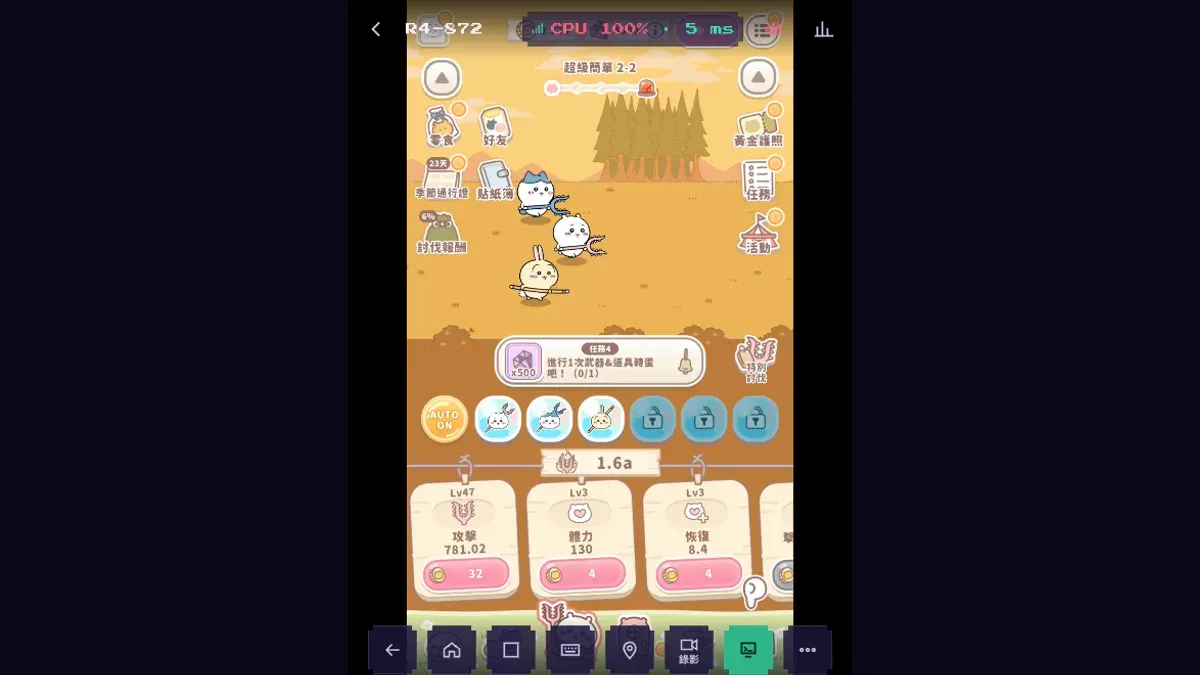
- Flying presents: Kouryaku Daihyakka says a present now and then floats across the open battle screen. Watch an ad and it pays out coins scaled to your current level, but it is gone once it drifts off the edge. Keep the cloud phone in a small browser window and tap when you spot one.
- Snacks (oyatsu): pick one from the top left of the battle screen and watch an ad to eat it, and the boost lasts 20 minutes. The Gold Pass, the Japanese version's paid pass, eats the next one for you when the effect ends. Without it, save snacks for when you are pushing stages and watching.
- 2x battle speed: it heads Kouryaku Daihyakka's list of ad rewards. Like snacks, it pays off most while you are there to watch.
- Picture-in-picture: Safari on iPhone and desktop browsers can shrink the cloud phone into a floating window, so you can watch something else and still catch a present.
To be clear, watching means receiving a video stream, which uses data. What a cloud phone saves is the part where your own phone keeps the game open all day just so the coins never cap.
What players say: an early beginner-pitfalls post on Bahamut suggests that when a stage keeps falling just short, you try again with the speed-up turned off; the author found that speed-up can drop frames and the lost frames cost damage. That is one player's experience, not an official note, but it is a cheap thing to try when you are stuck.
What to upgrade first: Chiikawa Pocket upgrade order
Coins from battles do nothing until you spend them on stats, and Japanese guide sites agree on where they go first: attack. The names below are the ones Japanese guides use, and the global version may label them differently.
- Attack first: Kouryaku Daihyakka and Game8 both put most coins into attack, because faster clears earn more coins. Kouryaku Daihyakka gives the full order as attack, critical rate, critical damage, health, then recovery, and the two critical stats only appear once health reaches level 3000. On a cloud phone, open a big window in a PC browser and spend everything that piled up in one go, instead of tapping away on a small screen.
- Read how you lose: Game8 splits it neatly. If the timer runs out, you lack damage, so upgrade attack, weapons and helpers (otasuke). If you get knocked out, you lack bulk, so upgrade health, recovery and tools. A loss costs little anyway: the game drops back one stage and keeps looping. On a cloud phone the app stays open, so those fallback loops keep earning while you are away, and you can check later which wall you hit.
- Weapons add attack, tools add health: Kouryaku Daihyakka says to compare the bonus number within the same rarity, and duplicates level an item up. Swap new gear in on the team screen. On a PC screen the numbers are easy to compare, so good gear does not sit unequipped.
- Fill new slots: extra party and helper slots unlock as you clear certain stages. With AUTO ON pushing stages on the cloud phone, look for new slots on every visit, because an empty slot is lost power.
Daily checklist: what to clear every time you check in
Several things in Chiikawa Pocket fill up and stop: the battle reward caps at 100%, weeding energy stops refilling once full, special battle tickets have a cap, and daily missions you miss are gone after the reset. So the trick is not to watch the game all day but to clear everything once or twice a day. Japanese guides give the reset as 15:00 Japan time for the Japanese version. The cloud phone runs the global version, so go by the in-game timer.
- Collect the battle reward, then take the ad bonus, three times a day at most. Kouryaku Daihyakka says the bonus is about half of what has piled up (not always exactly half), while AppMedia describes it as six hours' worth of coins and items. AppMedia also notes a one-hour wait after each bonus, so the three have to be spread across the day.
- Spend your coins on upgrades, attack first, as above.
- Use up your weeding energy: anything past full is wasted. Weeding drops the item that pays for study (fueramune in the Japanese version) and candy that levels up your characters.
- Queue a study: later studies run longer, from several hours to several days according to AppMedia. Ads cut 30 minutes off, four times a day, so spend them on the long one.
- Spend special battle tickets: according to Kouryaku Daihyakka, the bug battle pays out gems and the elephant battle pays out upgrade coins. Use tickets before they hit the cap.
- Clear the daily missions: AppMedia's list for the Japanese version adds up to 4,700 gems a day including the ad-unlocked extras, 1,000 of them from the final "complete all of today's missions". They reset daily, and the season pass has daily missions of its own.
- Grab the freebies: the ad-supported free pulls (three each on the weapons and tools gacha and the helper gacha, per AppMedia), the roulette (up to four spins a day) and the free pack in the daily shop.
- Om Nom Fest: watch one ad first for the cooking coin boost, which AppMedia says lasts eight hours, then collect the cooking coins and put them into dish levels. During events, play the event battles and claim event missions too.
Every item is a tap you make yourself. Where a cloud phone helps is timing: ad bonuses need an hour between them and studies run for hours, so rather than guarding one handset, open it on a PC at lunch and in your phone's browser on the way home. Both visits land on the same cloud phone and the same save.
What players say: the friend list is easy to miss. In a September 2026 thread on Bahamut, players learned that friends add extra candy to the battle reward claim, and several replied that they had assumed friends did nothing. The opening post of the friend-code thread says the cap has gone from 10 to 50, and new codes were still being posted in November 2026. Check the in-game screen for the actual bonus; friends who log in daily are the useful ones.
Should you reroll? Gems and gacha levels
No. Dengeki Online, Kouryaku Daihyakka and Game8 agree: the gacha has its own level that rises the more you pull, and higher rarities only start dropping as it climbs (Kouryaku Daihyakka says 5-star items from level 5 and 6-star from level 6). At the start the level is low, so rerolling a few times will not land anything good. Starting early and pulling more pays off better.
- Two gacha: weapons and tools, and helpers, the characters that jump in automatically during battles. Game8 suggests weapons and tools first, with both at around level 4 early on. Kouryaku Daihyakka adds that levels get slow around 7, which is the time to focus your gems on one side.
- Gems come from the daily list: daily missions, the roulette, the bug special battle, season pass ranks and the free daily shop pack all give gems. The more of the list you clear, the faster your gacha level climbs.
- On a cloud phone: skipping rerolls means no wiping data and remaking accounts. Keep one account on one cloud phone and collect its gems from any browser every day, so none go missing and the gacha level climbs on its own.
What unlocks when: weeding, study and Om Nom Fest on a new account
A new account starts with most features locked, and AUTO battles open them up one by one. These conditions come from Kouryaku Daihyakka. Stage names are the Japanese difficulty tiers (mucha kantan is roughly "super easy", kantan "easy"), and the global version may label them differently.
| Condition (Japanese names) | Unlocks |
|---|---|
| Clear mucha kantan 2-10 | 3rd party slot, 2nd helper slot |
| Clear mucha kantan 3-10 | Weeding, 4th party slot |
| Weed your way to 25 m | Study |
| Clear mucha kantan 4-10 | 3rd helper slot |
| Clear mucha kantan 7-5 | 5th party slot |
| Clear mucha kantan 10-10 | The kantan difficulty |
| Clear kantan 1-1 | Om Nom Fest |
| Clear kantan 2-10, 5-10 and 10-10 | 4th, 5th and 6th helper slots |
| Health at level 3000 | Critical rate and critical damage upgrades |
Stages fall to battles. With the app open the team loops and earns all the time, so upgrades keep pace and the stages keep moving. Park a new account on a cloud phone and check the next row each time you look in: fill a new party or helper slot straight away, spend weeding energy the moment weeding opens, and push on to 25 m to get study going.
Moving your save from your phone to a cloud phone
A cloud phone is a fresh Android device, so carrying your progress over comes down to the account link. Kouryaku Daihyakka, writing about the Japanese version, says you can link a Google or Apple account from the Account entry in the in-game menu, and that redeeming serial codes also needs the link plus an age check. Go by the menu names in the global version.
- On your current phone, open the account settings in the game menu and check that a Google or Apple account is linked. If not, link one now: that is what lets another device pick up the save.
- On the cloud phone, search Chiikawa Pocket in Google Play and install it. The Taiwan store serves the global version (package jp.co.applibot.chiikawapocketgl).
- Open the game, go to the same account menu and sign in with the account you just linked.
- Check the numbers: coins (big amounts use letter units, each letter a thousand times the last), stat levels and gacha levels should all match before you call it done.
- Make sure AUTO ON is on. From here on, your own phone no longer needs the game open.
If your save is linked to Apple, check that the cloud phone's sign-in screen offers an Apple option before you rely on it. If you play in Japan, note that the Japanese edition (ちいかわぽけっと) is a separate app, and we have not confirmed whether its data carries over to the global one. For a nickname in another script, type it on your own device and paste it into the cloud phone with Ctrl+V or Cmd+V (allow clipboard access in the browser).
What players say: players on Bahamut who moved the game to another device to leave it running all report the same thing. One account runs on one device at a time: signing in on the new device logs the old phone out, and going back means signing in on the phone again. So once the save is on the cloud phone, keep it there instead of switching back and forth. Besides Google and Apple, one reply mentions a transfer code and password generated from the top-right menu and entered on the title screen. And in May 2026 a player linked Google but still could not restore the save after recycling the old phone; the only advice was to write to support with account details and purchase records. Do not wipe the old phone until the numbers match on the cloud phone.
Alt accounts: Applibot's terms and what it costs
Applibot's Terms of Service (last updated February 3, 2025) prohibit, among other things, having multiple accounts on one device without approval, using automation software, selling or transferring accounts, letting a third party use your account for money, and using the service commercially. Applibot decides what counts as a violation and may suspend the account.
So each account gets its own cloud phone, and you never switch accounts on one. The terms set no limit on accounts across devices, and they do not say whether a cloud phone counts as a device you control; both calls are Applibot's. One more thing worth knowing up front: all cloud phones currently go out through the same public IP, so to the game's servers your accounts arrive from one address. Keep it to an alt or two that you play yourself, and never run them for profit. The ban question gets its own write-up in Can a cloud phone get you banned?.
Prices are the beta prices. A 2D idle game should run fine on Starter (2 cores, 4 GB): NT$489 a month, or NT$419 a month billed yearly as one NT$5,028 payment. A main plus one alt is two devices, NT$978 a month; a third brings it to NT$1,467. Monthly billing has no lock-in, so you can stop renewing on the billing page any time and keep the device to the end of the period.
Common mistakes: what quietly goes to waste
- Leaving the app closed with the battle reward full: by AppMedia's ratio it fills in about half a day, and every hour after that earns nothing.
- Bunching the three ad bonuses: each one starts a one-hour wait, so if you remember in the evening you may only fit one or two. Morning, lunch and evening works.
- Leaving coins unspent: collecting rewards without upgrading leaves your stats stuck, and battles loop on the same stage.
- Letting weeding energy sit full: it stops refilling at the cap, so a full meter is wasted. Do a round of weeding first when you check in.
- Leaving study empty: study runs on real time, so an empty slot overnight is a night of progress lost. Queue the next one on every visit.
- Ignoring new slots: each condition in the unlock table adds a slot, and an empty one is lost power.
- Missing the daily reset: expired mission rewards are gone, which means fewer gems and a slower gacha level.
- Switching two accounts on one device: the terms prohibit it without approval. One account per cloud phone.
- Choppy picture or delayed taps: that is the connection, not the game. Run through the cloud phone lag fixes.
FAQ
How long does Chiikawa Pocket's battle reward take to fill, and what happens then?
AppMedia puts 50% at about six hours' worth, so a full 100% works out to roughly half a day. After that nothing more accrues while the app is closed. When you collect, an ad bonus is available three times a day with an hour between each. With the app open, coins land directly with no cap, which is what a cloud phone gives you.
What should I upgrade first in Chiikawa Pocket, and should I reroll?
Japanese guide sites agree: put most coins into attack, since faster clears earn more. If the timer runs out you need damage; if you get knocked out you need health. Skip rerolls: the gacha has a level that rises with every pull, and higher rarities only drop as it climbs, so starting early and clearing the daily list for gems pays off more.
Can I move my progress from my phone to a cloud phone?
A Japanese guide says the game links to a Google or Apple account from the Account entry in its menu. Link on your current phone, sign in with the same account in the game on the cloud phone, and check that coins and levels match. The cloud phone runs the global version; we have not confirmed whether Japanese-edition data carries over.
Can I run Chiikawa Pocket alt accounts?
Applibot's terms bar multiple accounts on one device without approval, so give each account its own cloud phone and never switch on one. The terms set no number across devices, and that call is Applibot's. Keep it to an alt or two you play yourself; the terms section of this guide covers the detail.
How much does idling Chiikawa Pocket on a cloud phone cost?
Starter is NT$489 a month, or an average of NT$419 a month billed yearly. Monthly has no lock-in: stop renewing on the billing page any time and use it to the end of the period.
Can the same account stay open on my phone and on a cloud phone at once?
Players report it cannot: one device at a time. Signing in on the cloud phone logs your phone out, and returning to the phone means signing in there again. Keep the account on the cloud phone and check it from your phone's browser.
What do friends do in Chiikawa Pocket?
Players on Bahamut report that friends add extra candy when you claim the battle reward. The friend-code thread says the cap has risen from 10 to 50. Check the in-game screen for the actual bonus; friends who log in daily help most.
Sources
- Google Play: Chiikawa Pocket
- Chiikawa Pocket official global website
- CyberAgent press release: Chiikawa Pocket launches in 43 countries and regions, March 27, 2025
- Applibot Terms of Service (last updated February 3, 2025)
- Kouryaku Daihyakka: how battles work and tips, updated April 2, 2025 (Japanese)
- Kouryaku Daihyakka: FAQ, updated March 31, 2025 (Japanese)
- Kouryaku Daihyakka: how to collect coins efficiently and what to spend them on, updated April 4, 2025 (Japanese)
- Kouryaku Daihyakka: how to progress efficiently early on, updated April 23, 2025 (Japanese)
- Kouryaku Daihyakka: which gacha to pull and how to raise the gacha level, updated April 6, 2025 (Japanese)
- AppMedia, "Daily things to do in Chiikawa Pocket", updated 2025-08-13, site no longer updated (Japanese)
- Game8: daily to-do list, updated October 6, 2026 (Japanese)
- Game8: how to progress efficiently early on, updated October 6, 2026 (Japanese)
- KAI-YOU: we played Chiikawa Pocket, March 27, 2025 (Japanese)
- Dengeki Online: can you reroll in Chiikawa Pocket?, March 27, 2025 (Japanese)
- TVBS News: Chiikawa mobile game launches March 27, March 20, 2025 (Chinese)
- Bahamut forum: Is there a Chiikawa Pocket discussion board?, September 21, 2026 (friends add candy to battle rewards, player reports; Chinese)
- Bahamut forum: friend-code thread, from October 17, 2025 (friend cap, player reports; Chinese)
- Bahamut forum: coins and battle rewards rise with the screen open, March 31, 2025 (signing in elsewhere logs the phone out; Chinese)
- Bahamut forum: idling on an emulator, April 1, 2025 (one device at a time; Chinese)
- Bahamut forum: how do I move my save to another phone?, March 31, 2025 (Google link and transfer code; Chinese)
- Bahamut forum: Google linked but the save will not transfer, May 22, 2026 (one player's case; Chinese)
- Bahamut forum: beginner pitfalls in Chiikawa Pocket, March 28, 2025 (player experience; Chinese)